
News & Events
Two Days Hands-on Workshop on Vibe Coding Tools – Kiro and Cursor
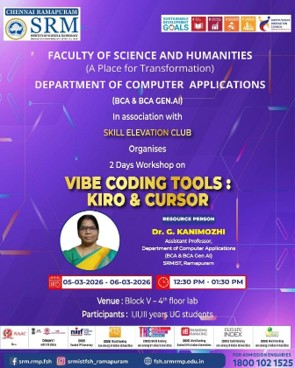
EVENT TITLE : Two Days Hands-on Workshop on Vibe Coding Tools – Kiro and Cursor
DATE: 05-03-2026 to 06-03-2026
TIME : 12:30 PM – 01:30 PM
VENUE: Block V- 4th floor lab
EVENT CONVENER: Ms. Adyasha Samal
EVENT COORDINATORS : Ms. Adyasha Samal , Dr. G Kanimozhi
NO. OF PARTICIPANTS : (30)
RESOURCE PERSON DETAILS - BRIEF PROFILE OF THE SPEAKER
Dr. G Kanimozhi,
Assistant Professor,
Department of Computer Applications (BCA & BCA Gen AI)
SRMIST, Ramapuram
SUMMARY OF THE EVENT:
The Department of BCA organized a two-day hands-on workshop on “Vibe Coding Tools – Kiro and Cursor” on March 5 and March 6, 2026. The workshop aimed to introduce students to modern AI-assisted coding tools that enhance programming productivity and improve software development practices. The program provided students with practical exposure to AI-powered coding environments and demonstrated how developers can efficiently write, debug, and optimize code using advanced tools.
The workshop was conducted by Dr. G. Kanimozhi, who served as the resource person for the event. The program was successfully coordinated by Mrs. Adyasha Samal, who ensured smooth organization and participation of students.
Objectives of the Workshop
The key objectives of the workshop were:
● To introduce students to modern AI-powered coding tools.
● To provide hands-on experience with Kiro and Cursor coding environments.
● To demonstrate how AI can assist in code generation, debugging, and optimization.
● To enhance students’ programming skills and creativity.
● To encourage students to use AI tools for innovative software development.
Day 1 – Introduction to Vibe Coding and Kiro
The first day of the workshop focused on introducing the concept of Vibe Coding and exploring the Kiro coding tool.
The session began with an overview of AI-assisted programming and the role of intelligent coding assistants in modern software development. The resource person explained how Vibe Coding simplifies programming by allowing developers to interact with AI tools to generate and refine code.
During the hands-on session, students learned how to install and configure the Kiro coding tool. The resource person demonstrated various features of the tool, including intelligent code suggestions, auto-completion, and debugging support.
Students practiced writing basic programs and explored features such as:
● AI-based code suggestions
● Auto code completion
● Error detection and debugging
● Code improvement and optimization
The first day concluded with an interactive session where students clarified their doubts and shared their learning experiences.
Day 2 – Cursor Tool and Practical Implementation
The second day focused on the Cursor coding tool, another powerful AI-assisted development environment.
Students were introduced to the key features of Cursor and learned how it helps developers write, modify, and improve code efficiently. The resource person demonstrated how Cursor can understand the context of code and provide intelligent assistance during programming.
Participants engaged in practical coding exercises where they created small applications using AI-generated code. Students also learned how to modify and optimize code using AI prompts.
Topics covered on the second day included:
● Introduction to Cursor AI coding tool
● Code generation using AI prompts
● Debugging and improving code with AI assistance
● Real-time coding support
● Best practices for using AI in software development
Students actively participated in the hands-on activities and gained valuable practical experience.
Student Activity and Competition
As part of the workshop, students were assigned a creative task to apply their learning. They were asked to design and develop a creative website or personal portfolio using the Kiro coding tool.
This activity encouraged students to use their creativity and apply the AI-assisted coding techniques learned during the workshop. Students worked enthusiastically on their projects and presented their websites and portfolios.
After evaluating the projects, the best three students were selected based on creativity, design, and effective use of the Kiro tool. To encourage and appreciate student efforts, prizes were distributed to the top three students as a token of appreciation for their outstanding work in developing creative websites and portfolios using Kiro
OUTCOMES OF THE PROGRAM: (Based of SDG)
SDG 4 – Quality Education
● The workshop enhanced students’ digital literacy by introducing modern AI-assisted coding tools such as Kiro and Cursor.
● Students gained hands-on learning experience, promoting practical and skill-based education.
● The program encouraged innovative learning methods by integrating AI technologies into programming practices.
SDG 8 – Decent Work and Economic Growth
● The workshop helped students develop industry-relevant technical skills required in modern software development.
● Exposure to AI-powered development tools prepared students for future job opportunities in the technology sector.
● The program encouraged students to improve productivity and efficiency in coding, which supports professional growth.
SDG 9 – Industry, Innovation and Infrastructure
● The workshop promoted awareness of emerging technologies such as AI-assisted coding environments.
● Students were encouraged to apply innovative approaches in software development through AI-based tools.
● The practical sessions strengthened students’ ability to use advanced technological tools for building digital solutions.
SDG 11 – Sustainable Cities and Communities
● The program promoted digital innovation and technology awareness among students, contributing to smart and technology-driven communities.
● Students were encouraged to develop creative digital solutions such as websites and portfolios that support knowledge sharing and digital communication.
● The workshop fostered technological skills that can contribute to building sustainable and digitally empowered societies.